Payment reminders that stop when a customer disputes the invoice
Automate overdue invoice reminders without annoying customers: rules decide, AI writes the email, and a dispute stops every reminder.
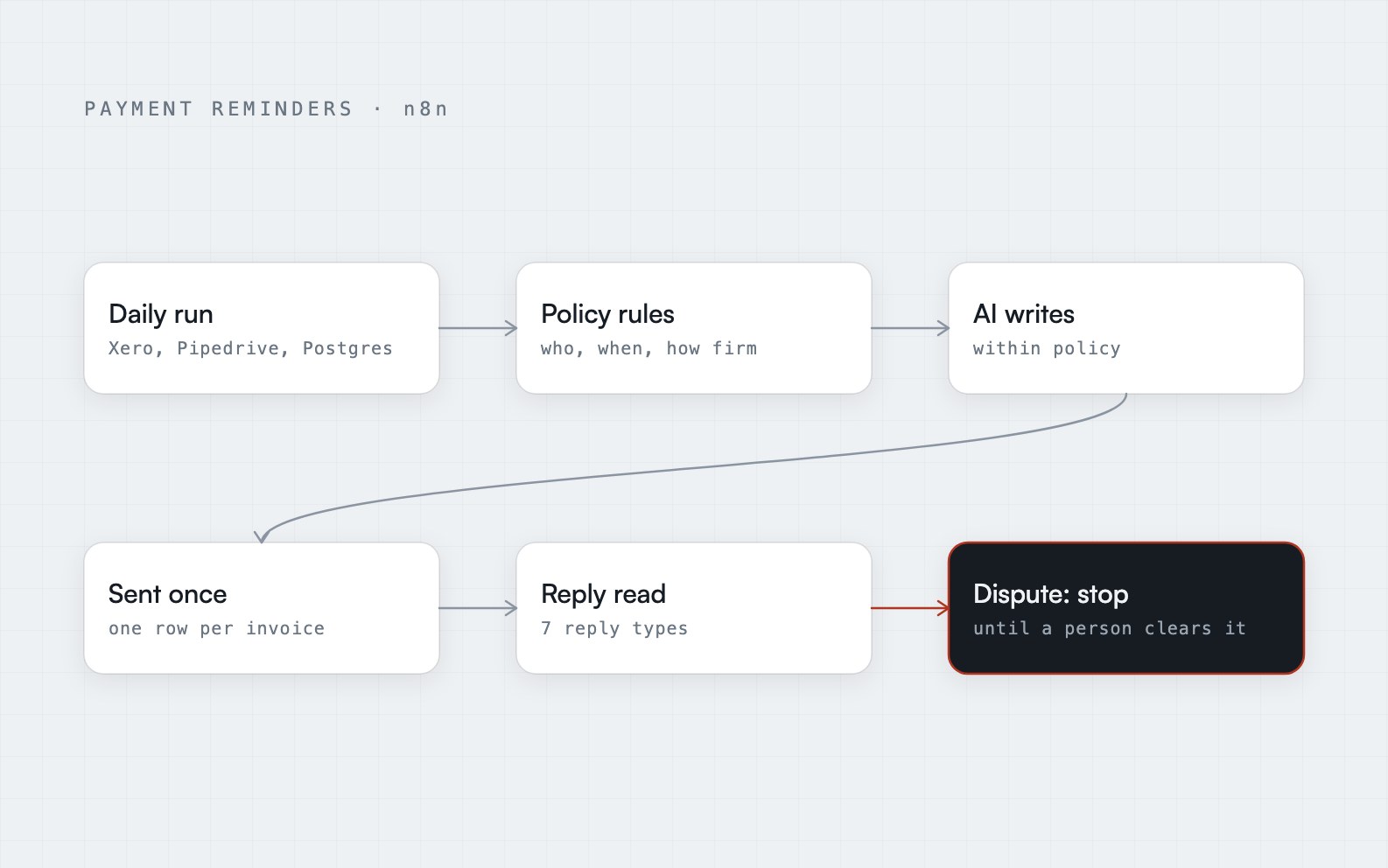
The short answer: automated payment reminders work when fixed company rules decide who gets chased and how firmly, and AI only writes the wording. Add a database rule that allows one reminder record per invoice, so nothing sends twice. Read customer replies and act on them. And make a dispute stop every reminder until a person clears it, with no timer and no automatic restart.
What goes wrong with manual chasing
Chasing unpaid invoices by hand is inconsistent. Some invoices get a reminder every day, others none at all. The failures that damage relationships are the wrong reminders:
- A customer who disputed the invoice keeps getting chased.
- A customer who promised a payment date keeps getting chased.
- A customer who already paid gets a reminder anyway.
- Replies sit unread in an inbox while the next reminder goes out.
- A harsh final notice lands on a key client and surprises the account manager.
Every one of those is a failure of information, not effort. The person sending the reminder did not know what the rest of the company knew. So the first job of automation here is to gather that information before anything is sent.
I built a workflow for this: the AI Unpaid Invoice Reminders build. It is a complete working workflow for a fictional sample client, TalentBridge Staffing, and not a delivered client engagement. It is the worked example for the rest of this article.
Gather the facts from three places
The workflow runs every morning and loads its data once:
- Xero for the unpaid invoices and each customer's billing email.
- Pipedrive for the account owner and any open deals.
- Postgres (a database) for the reminder history.
Reminder history is the one people forget. Without it, the workflow has no memory, so it cannot know that it sent a reminder yesterday or that this customer already received a final notice.
Rules decide, AI writes
This is the principle the whole build rests on: who gets a reminder, when, and how firmly is decided by company policy, never by the AI.
The rules skip disputed invoices, wrong contacts and promised dates. They decide how firm the reminder should be as the invoice gets later. Only then does the AI get involved, and only to write the email.
The AI is told to stay inside the approved policy: firmer the later the invoice is, with no invented fees, no accusations and no legal threats. The subject line is built by rules, not by the model. That restriction is the safety feature. A model that can set its own tone can threaten a customer on your behalf, and you will find out from the customer.
The general lesson is one I keep coming back to in error handling is the whole job: keep the fixed decisions in fixed rules, and let the AI do the part that is really about language.
One record per invoice, enforced by the database
A reminder must never go out twice. The cleanest way to guarantee that is to make it impossible, not just unlikely.
Each reminder is recorded in Postgres, where one record per invoice is enforced. If the workflow runs twice, because it was started again or because an earlier run failed halfway, the database refuses the second record, so the second reminder is never sent.
The technical word for this is idempotency: doing the same thing twice has the same result as doing it once. It works best when the database enforces it. A check in the workflow that asks "did I already send this?" can have a bug. A rule built into the database cannot be forgotten.
The final notice is a human decision first
At 30 or more days late, the workflow does something deliberately cautious. It tells the account owner in Slack and creates a Pipedrive task first. Only one final notice ever goes out, and after that the account owner takes over.
This answers the problem of the surprised account manager. The person who owns the relationship hears about the final notice before the customer does, and they can step in if the customer is a key client.
Read the replies, and treat them as instructions
Reminders only matter if replies are read. In this build, AI reads each customer reply and pulls out the details that matter: promised dates, invoice numbers, dispute reasons and new contacts. Then the reply is routed.
- A promised payment sets the next reminder date.
- "Already paid" triggers a check in Xero.
- A request for an invoice copy is handled as a request, not as a dispute.
- A wrong contact updates who gets the reminders.
- A question goes to a person.
- A dispute stops everything.
The system understands seven kinds of reply. The list is not what matters. What matters is that a reply changes what happens next, instead of sitting unread while a timer sends another email.
A dispute stops everything, with no timer
This is the safeguard I would defend hardest. When a reply is a dispute, all reminders stop until a person clears it. There is no timer and no automatic restart. A Pipedrive task, a Slack alert and the saved emails make sure a person actually picks it up.
The design question is what should happen if nobody picks it up. Most systems answer "resume after some days". That is exactly how a customer who disputed an invoice receives a collections email a week later. Here the answer is that the reminders stay stopped, and the cost of that choice is a visible, assigned task.
When something fails
Failures go to Slack and an error log. Because of the one-record-per-invoice rule, tomorrow's run simply picks up where the failed one stopped, without sending twice. A broken run leaves a visible alert and a safe state, not a customer who got three emails.
What the team still does
Automation does not remove the people. In this build the team only handles disputes, questions, and final notices to important clients. Every overdue invoice is followed up consistently by policy, and every reply is read and acted on the same day. The work that remains is the work that needs judgment.
Where to go from here
The AI Unpaid Invoice Reminders case study has the process map and a short animated explainer. If you want collections follow-up like this built around your own accounting system and policy, that is end-to-end business process automation.
Frequently asked questions
Can AI send payment reminders automatically?
Yes, but the AI should only write the wording. Fixed company rules should decide which invoices get a reminder, when, and how firm it is, because an AI deciding its own timing and tone can chase the wrong customer or threaten one. Rules for the decisions and AI for the language is the safe split.
How do you stop reminders to a customer who disputes an invoice?
Read the customer's replies and classify them. When a reply is a dispute, stop all reminders for that invoice until a person clears it, and create a task and an alert so someone owns it. Avoid an automatic restart timer, since that is how a disputed invoice ends up chased again.
How do you make sure a payment reminder is never sent twice?
Enforce it in the database. Record each reminder in a table that allows only one record per invoice, so a second record is refused even if the workflow runs twice. A rule built into the database is more reliable than a check that asks whether a reminder was already sent.
What is dunning, and is it the same as invoice reminders?
Dunning is the process of following up on overdue payments, usually with a series of reminders that grow firmer over time. Automated invoice reminders are a form of dunning. The risk with a rigid series is that it ignores things like a dispute or a promised date, which is why the rules need to see the customer's history.