Invoice approval you can audit
How to automate invoice approval in n8n and keep control: duplicate checks, a three-way match by fixed rules, and a person signing off before anything posts.
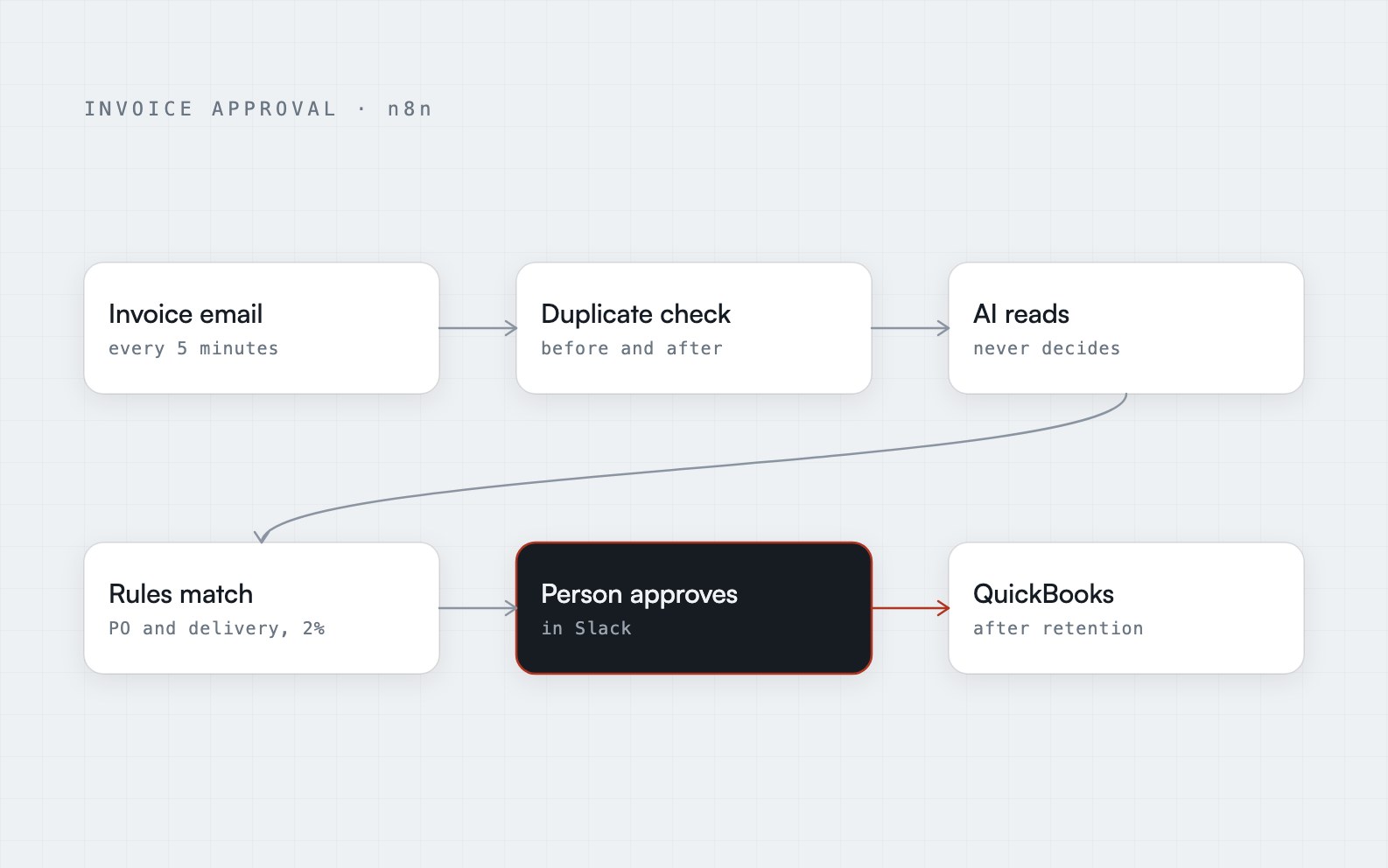
The short answer: you can automate invoice approval safely if the AI only reads and fixed rules decide. Check for duplicates before and after the AI reads the invoice, compare every invoice with its purchase order and delivery record using plain arithmetic (this is called a three-way match), send problems to the accounts payable team, and make a person approve every bill before it reaches your accounting software. Automation then removes the checking and the chasing, not the control.
Why invoice approval breaks when it is done by hand
In most accounts payable teams the week looks the same. Invoices arrive by email. Someone opens each PDF, finds the purchase order, finds the delivery record, compares three documents, and then asks someone else to approve it.
That process fails in predictable ways:
- Matching is slow, so it gets skipped when the team is busy.
- The same invoice arrives twice, in a new email, and gets paid twice.
- Approvers see a PDF, not the problems, so they approve what looks plausible.
- There is no single record of what was posted, rejected or held.
Construction makes it worse, because progress payments (partial payments made as the work is completed) invite specific mistakes: paying for the same work twice, paying in full when retention should be held back, or paying without a signed lien waiver. Retention is a share of each payment kept back until the job is finished. A lien waiver is a signed document in which the supplier gives up the right to claim against the property for that payment. I built a workflow for exactly that case, so this article uses it as the worked example. It is a complete working build for a fictional sample client, Braewick Construction Group, and not a delivered client engagement.
Step 1: pick up the invoice, and be honest about scans
The workflow checks Gmail every five minutes for unread emails with a PDF attached. That is deliberately boring. A regular check is easy to understand, easy to monitor and easy to restart.
One decision here saves money and avoids bad data: if the PDF is a scanned image with no readable text, it does not go to the AI. It goes to the team. An AI asked to read a picture with no text will produce something anyway, and that something looks exactly like a real invoice. Sending unreadable documents to a person costs a minute. Sending them to an AI risks a confident, wrong number in your accounts.
Step 2: check for duplicates twice
Duplicate payment is the cheapest mistake to prevent and the most embarrassing to explain, so the workflow checks twice.
- Before the AI reads anything, each email and file is checked against the invoice log. This catches the same invoice re-sent, and it happens before any AI cost.
- After the AI reads it, the workflow checks again by supplier and invoice number. This catches the same invoice arriving as a different file or in a differently worded email.
Two checks sound redundant until you realise they catch different failures. The first is about the message. The second is about the invoice itself.
Step 3: let the AI read, and never let it decide
This is the line I will not move. The AI's job is reading: supplier, purchase order and job numbers, cost code, invoice type, billing to date, amounts already approved, retention and lien waiver. It is told never to invent a value that is not on the page.
Everything after that is fixed rules. Arithmetic, allowed differences and routing are not an AI's job, because an AI never decides to stop. It always returns something. I wrote about the general version of that in error handling is the whole job, and invoices are where it matters most.
The one place the AI's own uncertainty is used is a confidence check. If the AI is less than 80% sure it read the invoice correctly, a person confirms the details in Slack before anything else happens. The 80% is a policy choice. What matters is that doubt has somewhere to go that is not your accounts.
Step 4: fixed rules do the three-way match
A three-way match compares the invoice with the purchase order (what you agreed to buy) and with the record that the goods or work were actually delivered. If all three agree, the bill is probably right.
The rules in this build are plain and fixed:
- Amounts are within 2% of the purchase order and delivery record.
- Billing to date adds up, including amounts already approved.
- Progress payments stay within the contract value.
- Retention is held back.
- A lien waiver is attached.
None of that involves a model. It is comparison and addition against records in Airtable. That is why an auditor can read it: every rejection has a rule behind it that you can point to.
Step 5: approval in Slack, routed by what was found
Where an invoice goes depends on what the rules found:
- Clean invoices go to the budget owner.
- Invoices with problems go to the accounts payable team, with the problems already flagged.
Either way, a person decides. The workflow waits up to two days for an answer, and nothing reaches QuickBooks without that approval. Approvers no longer open a PDF and hunt for what is wrong. They see the invoice, the match result and the specific problems, and they approve or reject in the same message.
This is the part finance leads care about most. The workflow does the checking. A person owns the money.
Step 6: post at the right amount, and never guess
Approved bills are added to QuickBooks. Two details matter:
- The amount is the amount to pay after retention, not the full amount on the invoice.
- A missing supplier is never guessed. If the supplier cannot be found in QuickBooks, the bill is held and the team is alerted. Creating a supplier from a guess is how you end up paying a lookalike.
Every outcome is logged, including rejections and holds, and the email is marked as read. Failures go to Slack and an error log with the invoice flagged for manual entry, so a broken run produces a visible to-do and not a silent gap.
What I would want you to know before building this
A few honest limits:
- The 2% allowed difference and the 80% confidence level are policy decisions. Your numbers will differ, and they should be set with whoever owns the budget.
- The rules above are written for construction progress payments. A different industry needs different rules, and writing them is most of the work.
- This is a sample build for a fictional client. The workflow is real and complete, but I am not claiming results from a live finance team.
What carries over to any industry is the pattern: duplicate checks, an AI that reads but does not judge, fixed rules, a person approving, and a record of everything.
Where to go from here
If you want to see the whole flow, the Invoice Processing and Approval case study has the process map and a short animated explainer. If you want something like it built and handed over with a runbook, that is end-to-end business process automation.
Frequently asked questions
What is a three-way match in accounts payable?
A three-way match compares an invoice with its purchase order (what you agreed to buy) and with the record that the goods or work were delivered. If the three agree within a set allowed difference, the invoice can be approved. In an automated version the comparison is done by fixed rules against your records, so every mismatch has a stated reason.
Can AI approve invoices on its own?
It should not. AI is good at turning a messy PDF into a list of fields, but approval is a decision with financial consequences. The safer design lets AI read the invoice, lets fixed rules check the numbers, and requires a person to approve each bill before it reaches your accounts.
How do you prevent duplicate invoice payments in an automated workflow?
Check more than once. Compare the incoming email and file against a log of past invoices before spending anything on the AI, then compare supplier and invoice number after the invoice has been read. The first catches re-sent messages, and the second catches the same invoice arriving in a different form.
How long does invoice approval automation take to build?
My published estimate for end-to-end business process automation is two to four weeks, but the real answer depends on the systems involved, the volume, and how many approval rules your policy has. The price is fixed before any build starts.