AI Unpaid Invoice Reminders
Every morning, checks Xero, Pipedrive and the collections database for unpaid invoices and sends reminders by set rules. AI writes the emails and reads customer replies; a dispute stops all reminders until a person resolves it.
- ORGANISATION
- Staffing & Collections
- ROLE
- AI Automation Engineer
- PLATFORM
- n8n
STACK
How this build works, in a short animated explainer.
THE WORKFLOW
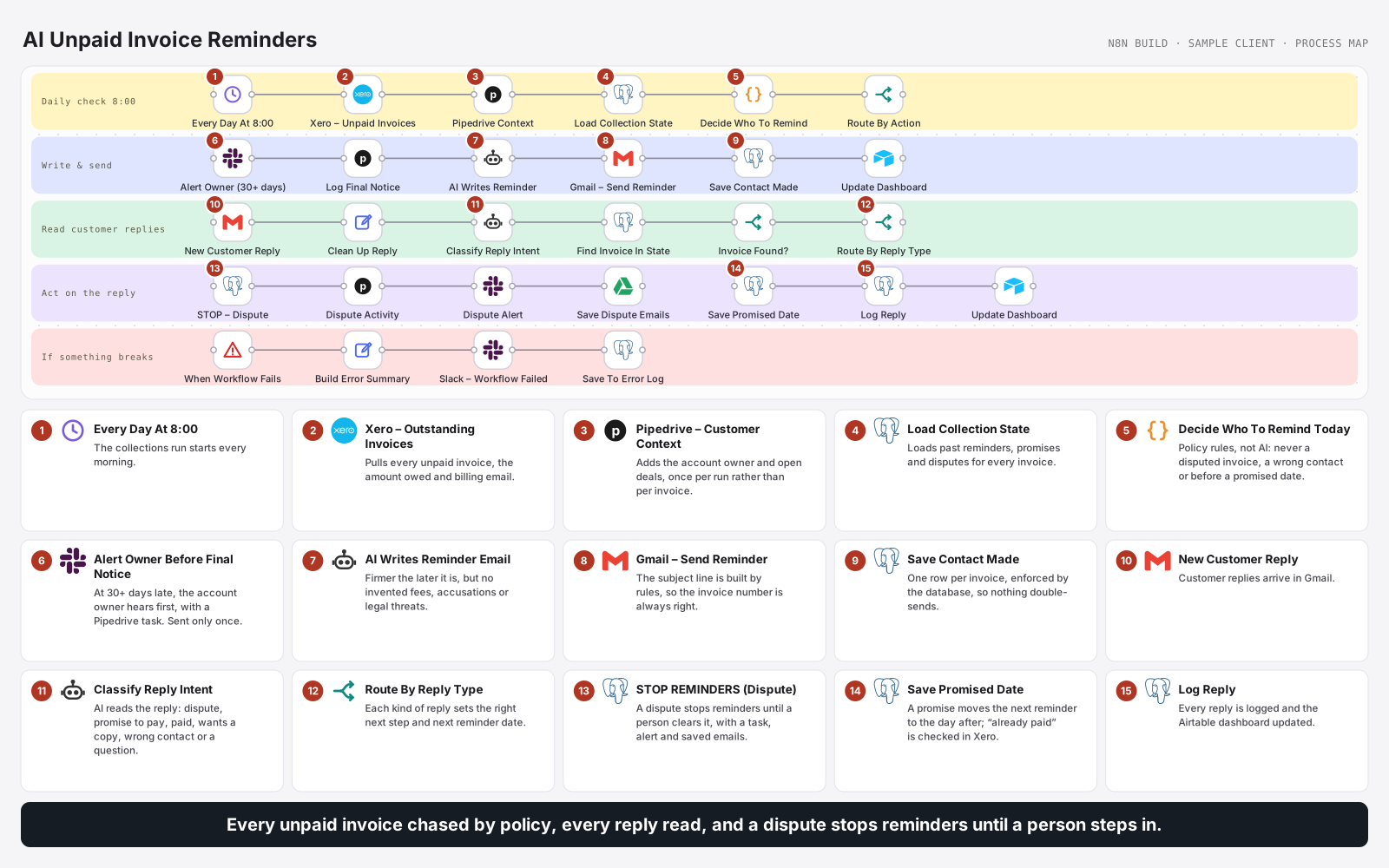
Daily check → unpaid invoices from Xero → customer context and reminder history → policy rules decide who to remind → AI writes the email → sent and recorded → replies read by AI → dispute stops reminders.
OUTCOME
Every overdue invoice followed up by policy, and every reply acted on.
The team only steps in for disputes, questions and final notices to important clients.
0
Reminders during a dispute
1
Row per invoice, enforced
7
Reply types understood
THE PROBLEM
Chasing unpaid invoices was manual and inconsistent. Reminders went out too often or not at all, customers who had disputed an invoice or promised a date kept getting chased, and replies sat unread while the next reminder went out.
WHAT I BUILT
Built an n8n workflow that runs every morning. It pulls unpaid invoices from Xero, client context from Pipedrive and reminder history from Postgres, and fixed policy rules decide who gets reminded and how firmly. AI writes each email within the approved policy. Customer replies are read by AI and routed: a dispute stops all reminders until a person clears it, and promises, payments, copy requests and wrong contacts each set the next step.
ACTIVE INTEGRATIONS
About this build
Built in n8n for TalentBridge Staffing, a fictional sample client. The workflow itself is real and complete.
The problem
- Inconsistent chasing. Some invoices got daily reminders, others none.
- Wrong reminders. Customers who disputed an invoice, promised a date or had already paid kept being chased.
- Unread replies. Replies sat in an inbox while the next reminder went out.
- Surprised account managers when a harsh final notice reached a key client.
What I built
- Data from three places. Xero for unpaid invoices and each customer's billing email, Pipedrive for the account owner and open deals, and Postgres for reminder history, loaded once per run.
- Policy rules decide. Which invoices get a reminder, and how firm, follows company policy, never AI. Disputed invoices, wrong contacts and promised dates are skipped.
- AI writes the email within the approved policy: firmer the later it is, with no invented fees, accusations or legal threats. The subject line is built by rules.
- Send and record. Each reminder is recorded in Postgres, where one row per invoice is enforced.
- One final notice. At 30+ days late, the account owner is told in Slack and given a Pipedrive task first. Only one final notice goes out; after that the account owner takes over.
- AI reads replies and pulls out promised dates, invoice numbers, dispute reasons or new contacts.
- Disputes stop reminders until a person clears them, with a Pipedrive task, Slack alert and saved emails.
- Every other reply sets the next date: promised payments, "already paid" checks in Xero, invoice copies, wrong contacts and questions.
- Error alerts. Failures go to Slack and an error log; tomorrow's run picks up without double-sending.
Safeguards
- A dispute stops all reminders until a person resolves it.
- No double sends, enforced by the database itself.
- Fixed rules for timing and tone; AI only writes the words.
- Account owners are warned before the one final notice, then take over.
Outcomes
- Every overdue invoice is followed up consistently, by policy.
- Every customer reply is read and acted on the same day.
- The team only handles disputes, questions and key-client final notices.
A dispute stops everything
A disputed invoice gets no more reminders until a person clears it. No timer, no automatic restart.
Rules decide, not AI
Who is reminded, when and how firmly follows company policy. AI only writes the wording within those rules.
No double sends
The database allows one row per invoice, so a reminder can never go out twice, even if the workflow runs twice.
KEEP READING
Other builds
What are you still
doing by hand?
Tell me the process that eats your week. I will tell you whether it is worth automating, and on which platform.
Ask about automation
Usually replies in seconds
Hi, I'm Ramon's assistant. Ask me about automation, the platforms I build on, or how an engagement works.