What an AI phone agent needs before it books real appointments
How an AI voice agent books, moves and cancels appointments on a live call: VAPI holds the conversation, n8n does the work, checks keep the calendar honest.
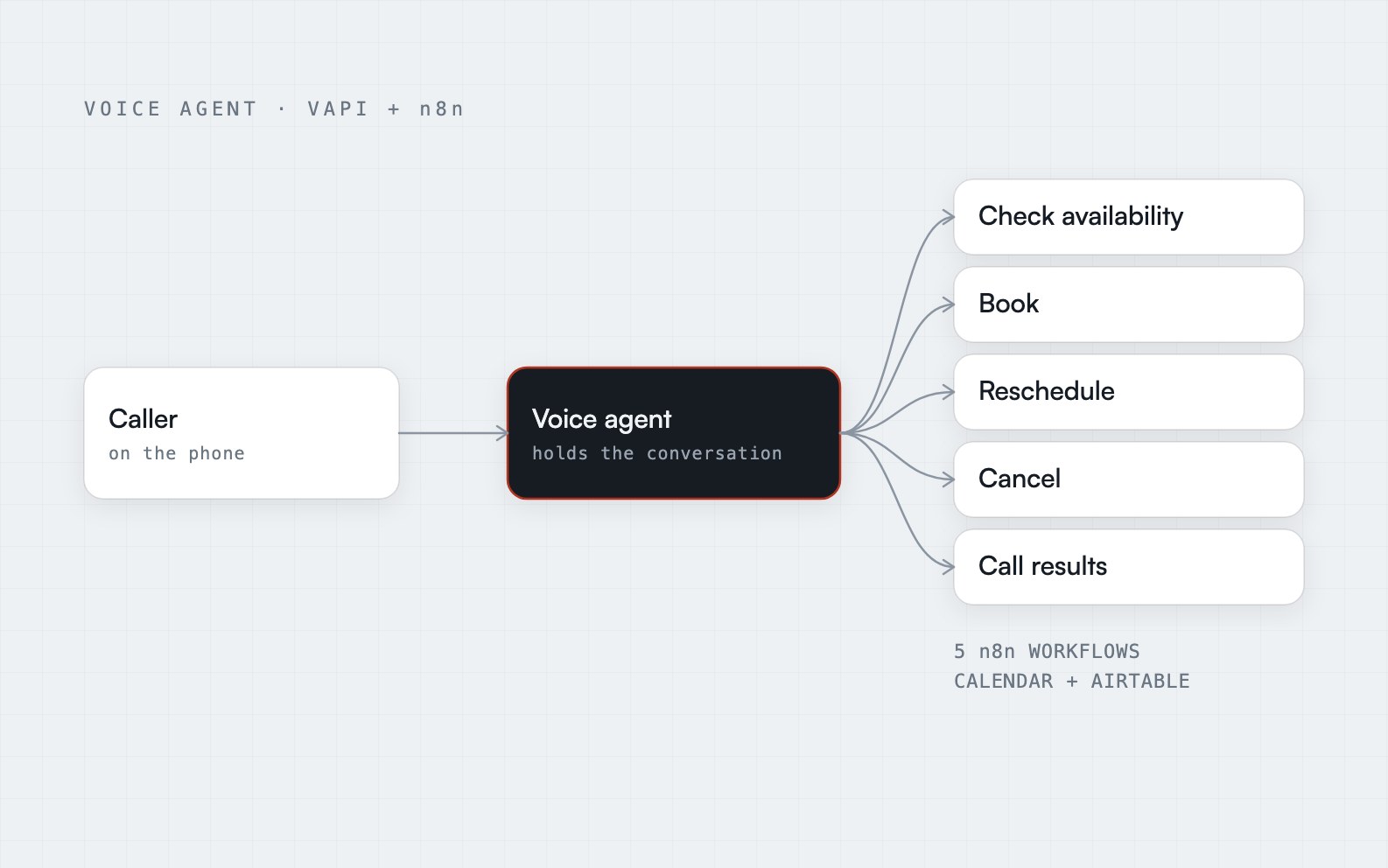
The short answer: an AI voice agent can book appointments on a live call if you split the job in two. The voice agent holds the conversation. Separate workflows do the real work on your calendar and records, and each one checks the details before it saves anything. In the build I describe here, VAPI is the voice agent, n8n runs five workflows, and Google Calendar and Airtable are updated together on every change.
The problem is the phone, not the calendar
Appointments that arrive by phone have a quiet cost. Calls after hours or during busy periods go unanswered, and most callers hang up without leaving a message. Answered calls are not much better: someone reads out free times, types the booking into the calendar by hand, and does it all again when the caller needs to reschedule or cancel. The calendar and the records drift apart.
A voice agent fixes the first problem by answering. It only fixes the second if it can do more than talk. That is where most demos stop and most real builds begin.
Split the conversation from the actions
The AI Appointment Setter is built around one rule: the voice agent never touches the calendar itself. It asks helpers to do the work, and the helpers are n8n workflows.
- The agent, built in VAPI, works out what the caller wants and asks for anything missing.
- Each helper is a workflow that does one job on the real systems and reports back in plain language. (Technically each one is triggered by a webhook, which is just a web address the agent can call.)
This split keeps each half simple. You can change how the agent talks without touching the booking rules, and you can test the booking rules without making a phone call. It also means the agent cannot invent an appointment. If the workflow did not succeed, nothing exists.
The five workflows
The build uses five n8n workflows:
- Check availability. Looks up the requested time in Google Calendar.
- Book. Creates the calendar event and records the booking in Airtable.
- Reschedule. Finds the original appointment and moves it.
- Cancel. Finds the appointment and removes it.
- Call results. Saves what happened on every call.
That covers the four things a caller asks for, plus a record of what happened.
Offer alternatives, do not just say no
The availability check does one useful thing beyond yes or no. If the requested time is taken, it returns the free time ranges, so the agent can offer alternatives while the caller is still on the line.
This matters more than it sounds. A phone call has no screen. A caller who hears "that time is not available" has to guess what to ask next, and many of them hang up. A caller who hears "I have Tuesday at ten or Wednesday at two" completes the booking.
Never book until the time is confirmed free
The rule that protects the calendar is simple: a time is only booked once the calendar shows it is free. Confirm at the moment of booking, not only at the moment of offering: a caller may take a minute to decide, and a slot offered earlier can be gone by the time they say yes.
It also checks that the caller has given everything needed before it does anything. If something is missing, the workflow does not guess. It tells the agent what to ask for. Then it converts the time to the business's time zone, creates the Google Calendar event and records the booking in Airtable.
Time zones deserve their own warning. A caller says "three o'clock", and the agent has to know which three o'clock. The conversion to the business's time zone happens in one place inside the workflow, so different parts of the system cannot work it out differently.
Rescheduling and cancelling are the hard half
Booking is the easy case. Changing an existing appointment means finding it first. The reschedule workflow finds the original appointment in Airtable, moves the calendar event, and updates the record. The cancel workflow finds the appointment, deletes the calendar event, and marks the record as cancelled.
The design choice that matters is both systems change at the same time. Calendars and spreadsheets drift apart when a person updates one and forgets the other. When every booking, change and cancellation updates Google Calendar and Airtable together, the two cannot disagree for long. I wrote about why that matters in error handling is the whole job: the dangerous failure is the one that looks fine.
Give the agent errors it can say out loud
On a web form, an error is a red box. On a phone call, an error has to be a sentence the agent can say out loud. So when a booking fails, the workflow gives the agent a plain explanation to pass on, so the caller always knows what happened and is never left hanging.
That is a small detail with a large effect on how the system feels. A silent failure on the phone sounds like dead air. A clear sentence sounds like a competent receptionist.
Log every call
The fifth workflow saves the outcome of every call in Airtable, creating or updating the caller's record. Before the build, there was no consistent record of who called and what happened. Afterwards, every call leaves one, so the team can see who called and what was agreed.
This is also how you improve the agent. You cannot fix the conversations you cannot see.
The cases I test before calling it done
I do not trust a voice agent after one clean demo call. These are the cases worth trying with a real voice:
- A caller who changes their mind halfway through a booking
- An ambiguous time, such as "Tuesday afternoon" or "after lunch"
- A time that was free when offered and taken before it was confirmed
- A caller who hangs up mid-booking
- A reschedule for an appointment that does not exist
- A request in the middle of the night, when the answer should be the same as at noon
For each one, the question is the same one I ask of any workflow: did it stop, did it say something sensible, and can I tell tomorrow that it happened?
Where to go from here
If you want to see how the pieces connect, the AI Appointment Setter case study has the process map and a short animated explainer. If you want a phone receptionist like this built for your own calendar and tools, that is my AI phone receptionist and customer chat service.
Frequently asked questions
How does an AI voice agent book into Google Calendar?
The voice agent does not write to the calendar itself. It asks a workflow to do it. The workflow checks Google Calendar for the requested time, confirms it is free, and then creates the event. It also records the booking in a database or spreadsheet, so the calendar and the records stay in step.
Can an AI phone agent reschedule and cancel appointments, not just book them?
Yes, but each is its own workflow. Rescheduling has to find the original appointment, move the calendar event and update the record. Cancelling has to find the appointment, delete the event and mark the record as cancelled. Finding the original booking correctly is the hard part.
What happens when the AI agent cannot make a booking?
The workflow returns a plain explanation for the agent to say to the caller, for example that the time is no longer free or that a detail is missing. Nothing is booked, moved or cancelled until the details are complete and the time is confirmed free, and the caller is never left with silence.
Do I need VAPI and n8n to build an AI receptionist?
No, but the pattern is the same on any platform: a voice agent for the call, and separate workflows you can test for the actions. This build uses VAPI for the agent and n8n for the workflows because that pairing lets you change and test the booking rules without touching the conversation.