
Order Stock Check
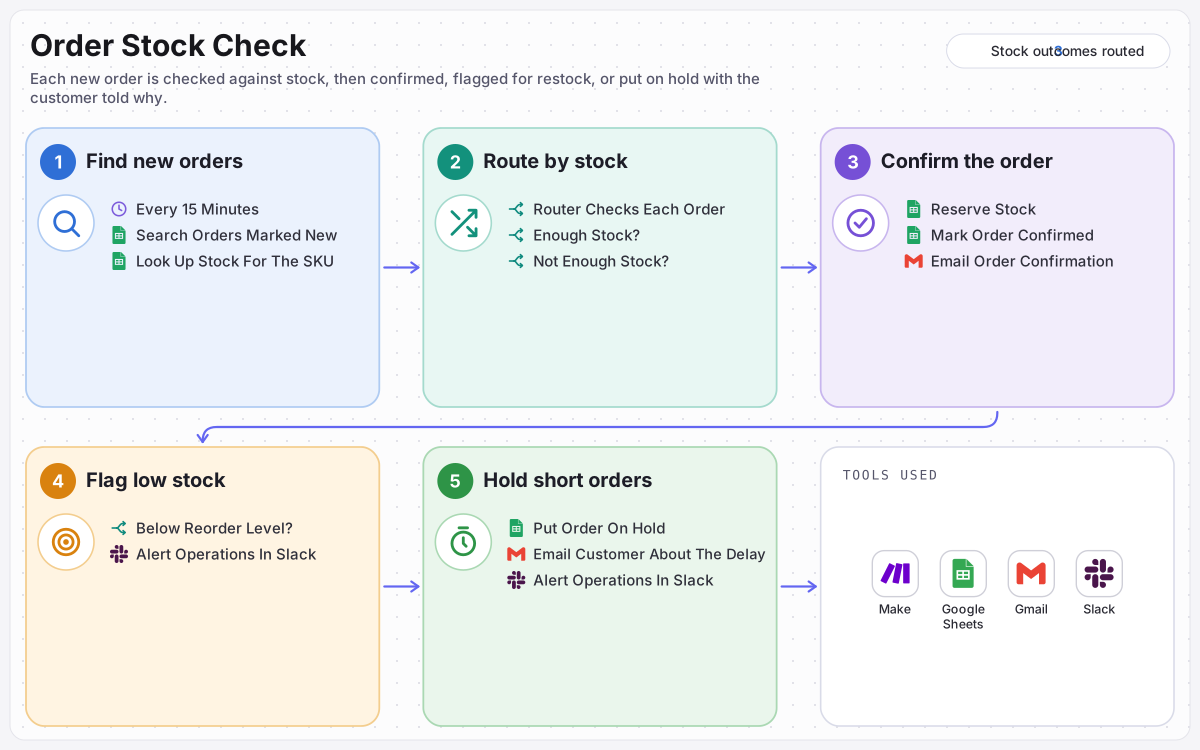
Every new order is checked against live stock before anyone promises it. Orders that can be filled are confirmed and reserved, stock that drops below its reorder level is flagged in Slack, and short orders are put on hold with the customer told why.
- ORGANISATION
- Online Homeware Store
- ROLE
- AI Automation Specialist
- PLATFORM
- Make
STACK
How this build works, in a short animated explainer.
THE WORKFLOW
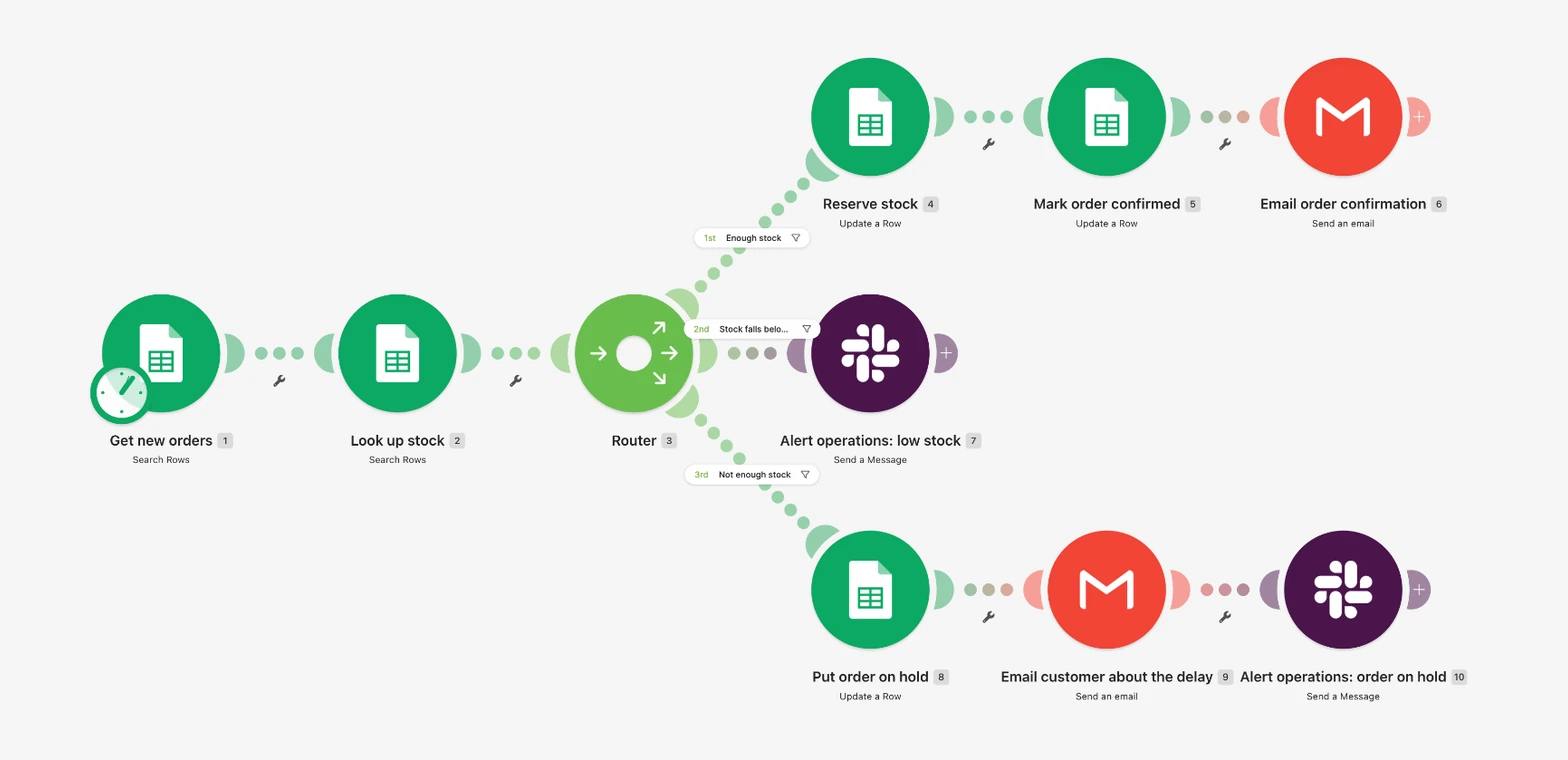
Every 15 minutes → orders marked New → look up stock → Router: confirm and reserve, alert Slack below the reorder level, or hold the order and tell the customer.
OUTCOME
No order is confirmed without the stock to fill it.
Customers hear back either way, and operations knows about low stock before it runs out.
15 min
Between order checks
A new order waits at most 15 minutes before it is checked against stock, so customers hear back quickly either way.
3
Stock outcomes
Enough stock: confirmed and reserved. Leaves stock low: confirmed, and operations told to reorder. Not enough: put on hold, and the customer told why.
10
Orders per run
Each check works through up to 10 new orders, and anything left over is picked up by the next check 15 minutes later.
THE PROBLEM
Orders were confirmed before anyone checked the shelf. Popular items sold out without warning, customers were promised products that were not there, and the first sign of low stock was an order that could not be filled.
WHAT I BUILT
Built a Make scenario that checks the order sheet every 15 minutes for new orders and looks up each product in the inventory sheet. A Router sends every order down the right path: confirm it, reserve the stock and email the customer; alert operations in Slack when stock falls below its reorder level; or put the order on hold, email the customer about the delay and alert operations.
ACTIVE INTEGRATIONS
About this build
Built on Make for Juniper & Moss, a fictional sample client selling mugs, tote bags and candles online. The scenario itself is real and complete, and has been run end to end on sample orders that cover all three stock outcomes.
The problem
- Promises before checks. Orders were confirmed without anyone looking at stock.
- Surprise sell-outs. Nobody noticed an item running low until it had run out.
- Customers left guessing. When an order could not be filled, the customer heard nothing.
- No record. There was no note of what happened to each order, or when.
What I built
- Find new orders. Every 15 minutes, the order sheet is searched for orders marked New, up to 10 per run, and each product is looked up by its SKU in the inventory sheet.
- Route by stock. A Make Router compares the quantity ordered with the stock on hand and sends each order down every route that applies.
- Confirm the order. When there is enough stock, the quantity is taken off the inventory, the order is marked Confirmed with a note of what was reserved and how much is left, and the customer gets a confirmation email.
- Flag low stock. When the order leaves stock below the reorder level, operations gets a Slack alert naming the product, the stock left and the reorder level. The order is still confirmed.
- Hold short orders. When there is not enough stock, the order is marked On hold with the quantity ordered and available, the customer is told about the delay, and operations is alerted in Slack to follow up within one business day.
Safeguards
- Plain rules, no guesswork: every decision compares two numbers from the sheets.
- Stock is reduced only for orders that can be filled in full, so it never drops below zero.
- Each order is stamped with its outcome and the time it was handled, so the sheet shows the full history.
- The delay email makes no promise of a date; a person replies with a restock date or an alternative.
Outcomes
- Every order is checked against stock before it is confirmed.
- Customers get a confirmation or an honest delay notice, never silence.
- Operations sees low stock early and every held order the moment it happens.
Stock is checked before every promise
An order is confirmed only when its full quantity is in stock, and every short order goes to a person.
Each order handled once
Only orders marked New are picked up, and each one gets a new status when it is handled, so a second run never repeats it.
Stock never goes negative
Stock is reduced only when the full quantity is available. Short orders are held, never partly filled.
A person owns the exceptions
Low stock and held orders both alert operations in Slack with the product, the quantity and the stock left.
KEEP READING
Other builds
What are you still
doing by hand?
Tell me the process that eats your week. I will tell you whether it is worth automating, and on which platform.
Ramon's assistant AI
Usually replies in seconds
What should come off your desk?
Hi, I'm Ramon's assistant. Ask me about automation, the platforms I build on, or how an engagement works.