
Client Pipeline Emails
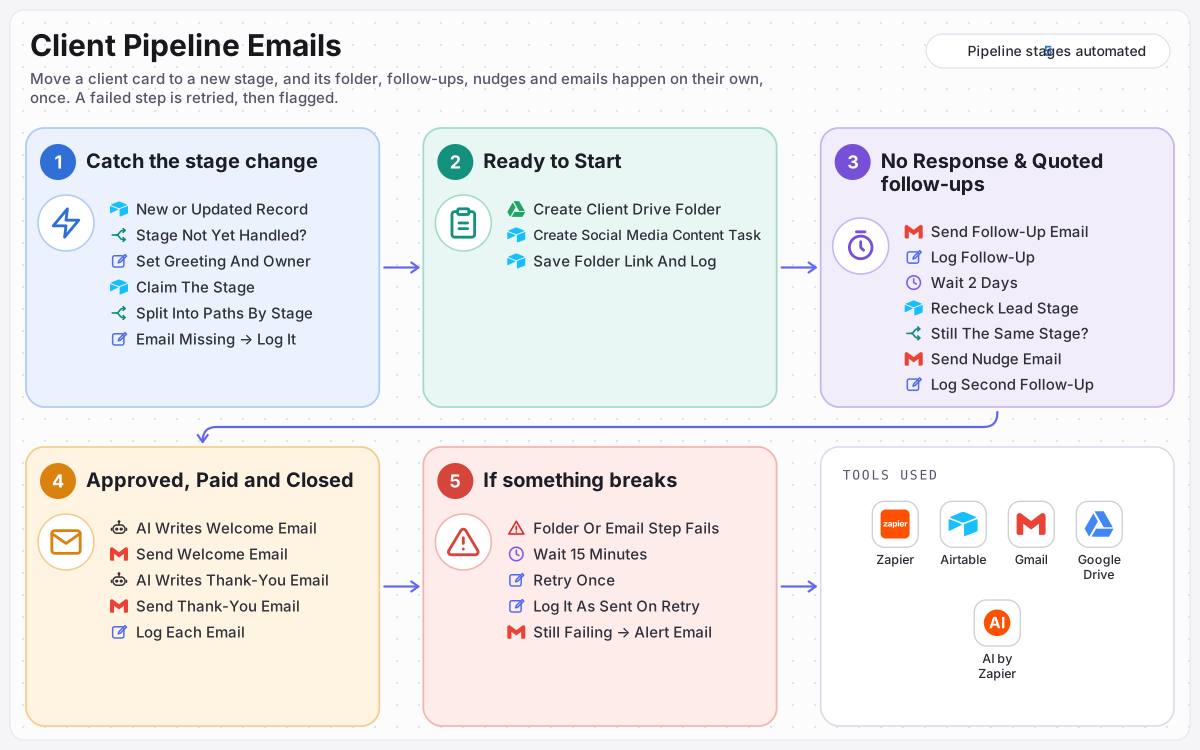
Move a client card to a new stage in Airtable and the next step happens on its own: a Drive folder and content task to start, follow-ups with a nudge two days later, an AI-written welcome when they approve, and a thank-you when the project is paid.
- ORGANISATION
- Agency Client Pipeline
- ROLE
- AI Automation Specialist
- PLATFORM
- Zapier
STACK
How this build works, in a short animated explainer.
THE WORKFLOW
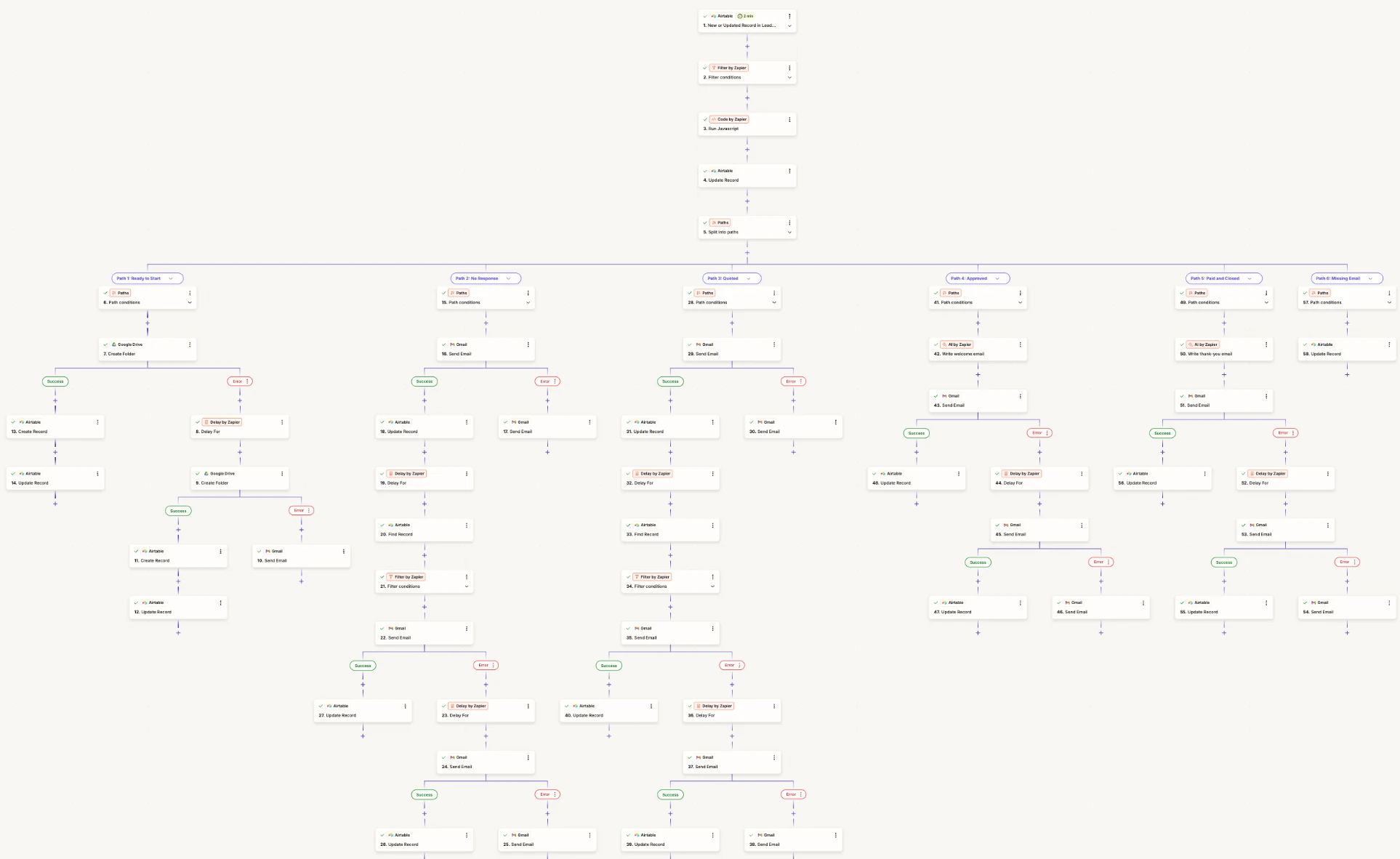
Airtable stage change → only new, unhandled stages → claim the stage → Paths: Ready to Start folder and task, No Response or Quoted follow-up and 2-day nudge, Approved AI welcome, Paid and Closed AI thank-you → failed steps retry once, then alert.
OUTCOME
Move the card, and the follow-up takes care of itself.
Each stage sets off its own next step, once, and every email it sends is logged on the lead.
5
Pipeline stages automated
Ready to Start, No Response, Quoted, Approved, and Paid and Closed each set off their own next step: a folder and task, a follow-up, a welcome or a thank-you.
2 days
Wait before each nudge
No Response and Quoted leads get a nudge two days after the follow-up, but only if they are still at that stage, so nobody is nudged after they reply.
1
Run per stage, per lead
Each stage is recorded on the lead before anything is sent, so moving a card back and forth never sends the same email twice.
THE PROBLEM
Every client sat on a pipeline board, but each stage still needed someone to remember the next step. Folders were made late, follow-ups were forgotten, quotes went quiet, and welcome and thank-you emails depended on whoever had time.
WHAT I BUILT
Built a Zapier workflow that runs when a lead changes stage in Airtable. It continues only for a stage it has not handled, claims that stage so it runs once, then splits into Paths: a Drive folder and a content task for Ready to Start, a follow-up and a two-day nudge for No Response and Quoted, and AI-written welcome and thank-you emails for Approved and Paid and Closed. Every action is written to the lead log, and a failed step is retried before anyone is alerted.
ACTIVE INTEGRATIONS
About this build
Built on Zapier for Kestrel Digital, a fictional sample client, a small agency selling consulting, builds and support. The workflow itself is real and complete: a classic Zap built with Paths, Delay and error handlers, running against an Airtable base.
The problem
- Next steps lived in people's heads. Moving a card on the board did nothing by itself.
- Folders came late. New projects started without a shared place for files.
- Follow-ups were forgotten. Quiet leads and unanswered quotes simply went cold.
- Uneven client emails. Welcome and thank-you notes depended on who had time that day.
What I built
- Catch the stage change. Airtable triggers the Zap when a lead's stage changes. A filter lets it through only for the five stages with an automation, and only if that stage is not already in the lead's Handled Stages.
- Claim the stage. A code step prepares the greeting and the lead owner's name. The stage is then added to Handled Stages before anything is sent, so the same change can never run twice, and Paths sends the lead down the route for its stage. A lead with no email address goes down its own path, where it is logged and skipped.
- Ready to Start. A Google Drive folder is created for the client, a Social Media Content task is added in Airtable, and the folder link is saved on the lead.
- No Response and Quoted. A follow-up email goes out from Gmail and is logged. Two days later the lead is looked up again, and if it is still at the same stage, a second nudge is sent and logged.
- Approved. AI writes a short welcome email covering the kickoff call and the shared project folder, which is sent and logged.
- Paid and Closed. AI writes a thank-you suited to the kind of work, whether consulting, a build or support, and asks for a referral or a short review.
- If something breaks. Each folder and email step has its own error handler. The folder, the nudges and the welcome and thank-you emails wait 15 minutes and try once more, logging a send that worked on the second try. If the retry fails, or a first follow-up fails, an alert email names the client and stage.
Safeguards
- Exactly once: a stage is claimed before it acts, so repeated or late changes back off.
- Fresh before a nudge: the board is checked again after the two-day wait, so a client who replied is never chased.
- Short, steady AI emails: the welcome stays under 150 words and the thank-you under 170, both signed by the lead's owner.
- A full record: every email and folder is written to the lead's Pipeline Log with a timestamp, including whether it went through on a retry.
- Failures surface: a step that fails twice, or a first follow-up that fails once, sends an alert email instead of failing silently.
- No email, no guess: a lead without an email address is logged and skipped until someone fills it in.
Outcomes
- Every stage on the board sets off its own next step without anyone remembering it.
- Quiet leads and open quotes get a follow-up and one nudge, then no more.
- New clients get a folder, a task and a welcome, and finished clients get a thank-you.
Nothing sent twice, nothing dropped
Each stage is claimed before it runs, a nudge is checked against the board before it goes out, and a failed step gets a second try.
Runs once per stage
The stage is recorded on the lead before anything is sent, so a repeated change never sends a second email.
No nudge after a reply
After the two-day wait the stage is checked again. If the lead has moved on, the nudge is not sent.
Retry, then alert
If a folder, nudge, welcome or thank-you step fails, it waits 15 minutes and tries once more. If it fails again, an alert email names the client and stage.
KEEP READING
Other builds
What are you still
doing by hand?
Tell me the process that eats your week. I will tell you whether it is worth automating, and on which platform.
Ramon's assistant AI
Usually replies in seconds
What should come off your desk?
Hi, I'm Ramon's assistant. Ask me about automation, the platforms I build on, or how an engagement works.