New Employee Onboarding
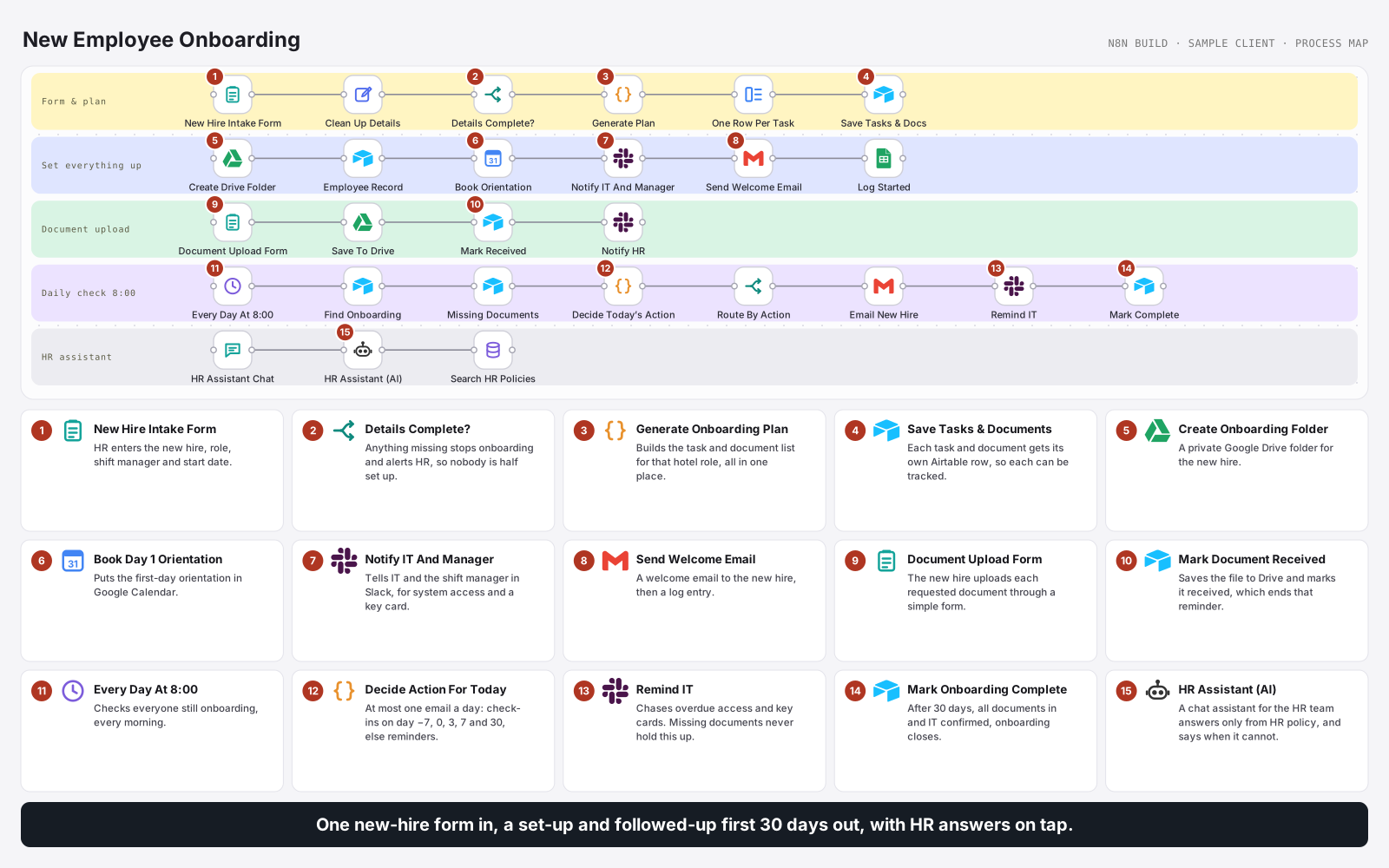
One new-hire form sets up a Drive folder, employee record, orientation, IT access request and welcome email, then tracks every task and document. A daily check sends reminders and check-ins up to day 30, and the HR team has a chat assistant that answers policy questions from company policy only.
- ORGANISATION
- Hospitality HR
- ROLE
- AI Automation Engineer
- PLATFORM
- n8n
STACK
How this build works, in a short animated explainer.
THE WORKFLOW
New hire form → onboarding plan for the role → folder, record, orientation, IT request and welcome email → tasks and documents tracked → daily reminders and check-ins to day 30 → policy assistant for the HR team.
OUTCOME
A new hire is fully set up from one form, and followed up for their first 30 days.
HR fills in one form; the tasks, reminders and check-ins take care of themselves, and policy answers are one question away.
30
Days followed up
5
Check-in milestones
1
Email a day, at most
THE PROBLEM
Every new hire meant the same setup by hand: folders, records, orientation, access requests and welcome emails. Documents were chased one email at a time, key cards and system access were forgotten, and the same policy questions reached HR again and again.
WHAT I BUILT
Built an n8n workflow where HR fills in one form. It builds the onboarding plan for that role, sets up the Drive folder, employee record, orientation and IT request, sends the welcome email, and records every task and document in Airtable. A daily check sends milestone check-ins and document reminders up to day 30, chases IT for access and key cards, and closes onboarding when everything is done. The HR team gets a chat assistant that answers policy questions using only company policy.
ACTIVE INTEGRATIONS
About this build
Built in n8n for Casa Marindo Hotel Group, a fictional sample client. The workflow itself is real and complete.
The problem
- Repeated setup of folders, records, orientation and access for every hire.
- Document chasing by individual emails, with no clear view of what was still missing.
- Forgotten access. Key cards and system access were late because nobody followed up.
- Repeat questions about policy reaching HR, with the risk of inconsistent answers.
What I built
- New hire form and plan. HR fills in one form. Missing details stop the run and alert HR; otherwise a plan of tasks and documents is built for that hotel role.
- Set everything up. A private Drive folder, the employee record, a Day 1 orientation in Google Calendar, a Slack message to IT and the shift manager, and a welcome email.
- Trackable rows. Every task and document becomes its own Airtable row with an owner and status.
- Document upload. The new hire uploads documents through a form; each is saved to Drive and marked received, which ends its reminders.
- Daily check at 8:00. At most one email a day per person: milestone check-ins on day −7, 0, 3, 7 and 30, otherwise a reminder for missing documents. IT is chased for access and key cards alongside.
- Close onboarding. After 30 days, with all documents in and IT confirmed, onboarding is marked complete and announced.
- HR assistant. A chat assistant for the HR team answers policy questions using only the uploaded HR policies.
- Error alerts. Failures go to Slack and an error log.
Safeguards
- Incomplete forms stop early, so nobody is half set up.
- One email a day at most, with missing documents folded into milestone emails.
- IT is never blocked by missing paperwork.
- The assistant says when policy is silent rather than guessing about pay, notice or rest breaks.
Outcomes
- New hires are set up the same way every time, from one form.
- HR can see every outstanding task and document in Airtable.
- The first 30 days are followed up without anyone tracking them by hand.
Nothing half set up
If key details are missing from the form, onboarding stops and HR is alerted, so nobody starts half set up.
Tracked, not emailed
Every task and document is its own Airtable row with an owner and status, so nothing relies on someone remembering.
Answers from policy only
The HR assistant never answers from general knowledge. If the policy does not cover it, it says so instead of guessing.
KEEP READING
Other builds
What are you still
doing by hand?
Tell me the process that eats your week. I will tell you whether it is worth automating, and on which platform.
Ask about automation
Usually replies in seconds
Hi, I'm Ramon's assistant. Ask me about automation, the platforms I build on, or how an engagement works.